How to Get Live Wallpapers on Mac
Imagine your Mac's lock screen showing a crackling fireplace instead of a static photo. Or your desktop displaying a rain-streaked coffee shop window while you work. Moving, breathing wallpapers that loop seamlessly forever.
macOS doesn't let you do this. Apple gives you their wallpapers or nothing.
But there's a way around it.
The Short Answer
gifPaper is a Mac app that finally lets you set your own video wallpapers on your lock screen, desktop, and screen saver. It comes with 150+ handcrafted wallpapers — fireplaces, neon cityscapes, cozy lofi scenes, space, nature, cats — all in 4K, all looping seamlessly forever.
Pick one, click, done. Your lock screen now has a crackling fireplace instead of Apple's default gradient.
That's the whole article if you're in a hurry. Keep reading if you want to understand what Apple gives you by default — and why it's probably not what you're looking for.
What macOS Actually Offers (And Why It's Confusing)
Open System Settings → Wallpaper on your Mac and you'll see several categories. Apple's naming is... not helpful.
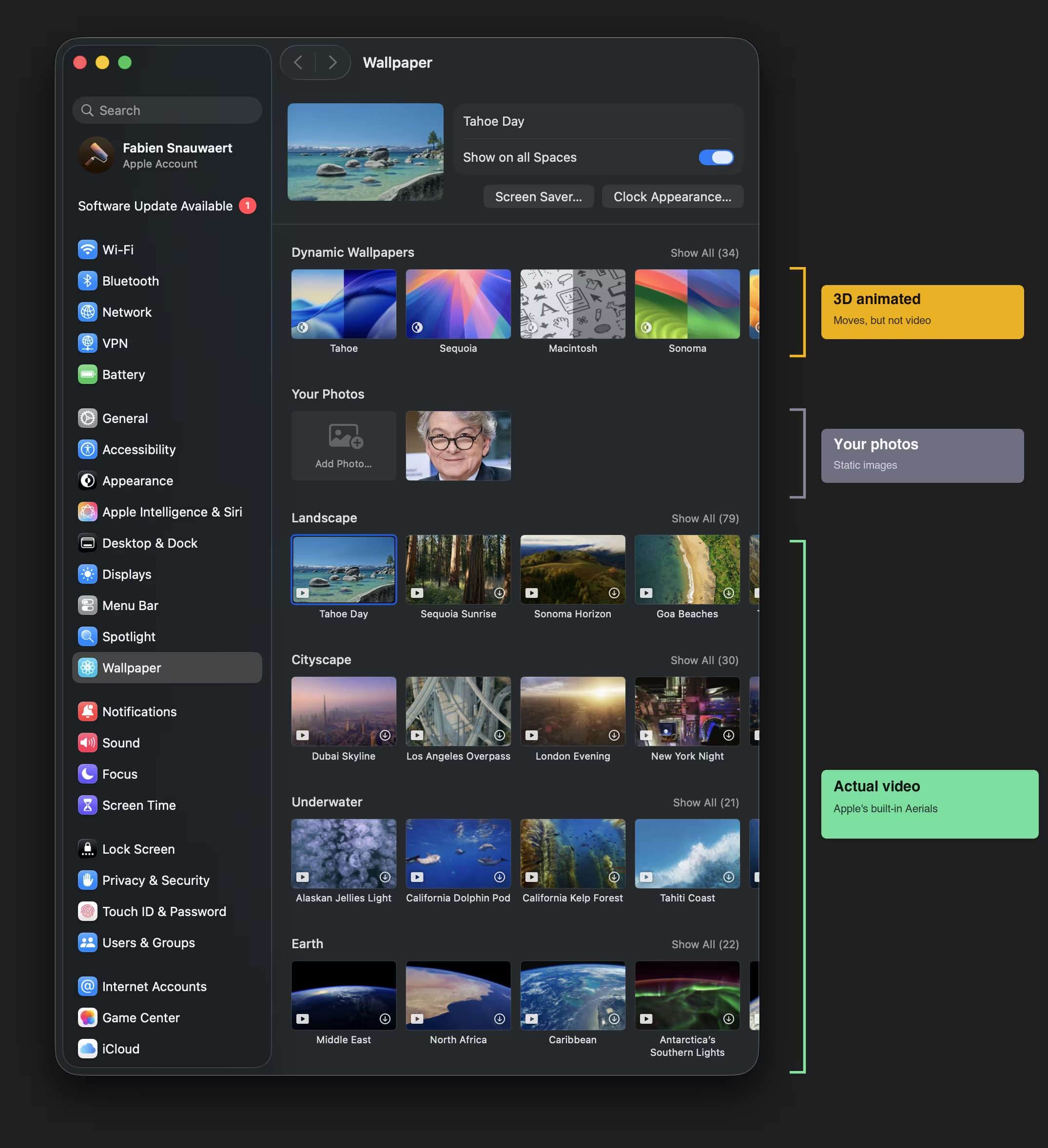
The naming is the first trap. "Dynamic Wallpapers" sounds like they move — and some do (they're 3D animated) — but they're not video, and you can't add your own. The Aerial categories (Landscape, Cityscape, Underwater, Earth) are actual video, but again: Apple's collection only. No uploads, no customization.
Apple's Wallpaper Types, Explained
| What Apple Calls It | What It Actually Does | Add Your Own? |
|---|---|---|
| Dynamic Wallpapers (Big Sur, Catalina, etc.) | 16-24 still images that swap based on time of day. Not animated. | Yes (creating the file is the hard part) |
| Aerial (Landscapes, Cities, Sequoia Sunrise) | Actual video wallpapers — drones over New York, waves in Hawaii, Lake Tahoe at sunrise | No |
| Sequoia, Sonoma, Ventura, Monterey | Real-time 3D renders with lighting that shifts throughout the day. Pretty, but limited to these four. | No |
| Pictures | Static images | Yes |
The confusion: When people search for "dynamic wallpaper mac," they usually want video wallpapers — things that actually move. Most of Apple's "Dynamic" wallpapers are just slideshows that change throughout the day. They don't animate.
The Aerial wallpapers are what most people mean by "live wallpaper" — actual video playback. And Apple doesn't let you add your own.
That's where gifPaper comes in.
How gifPaper Works
I wanted a Greek god doing deadlifts on my lock screen (don't ask why). Apple said no. So I spent two weeks reverse-engineering their Aerial format — the undocumented system behind Apple's built-in video wallpapers — until my Mac couldn't tell the difference between their footage and mine.
That's gifPaper. Same native format, same system-level integration. Your Mac thinks these are Apple wallpapers. Technically, they are.
No hacks, no workarounds, no "floating window pretending to be a wallpaper." Native. They appear on:
- Your lock screen — the first thing you see when you wake your Mac
- Your desktop — behind all your windows
- Your screen saver — when your Mac goes idle
The Gallery
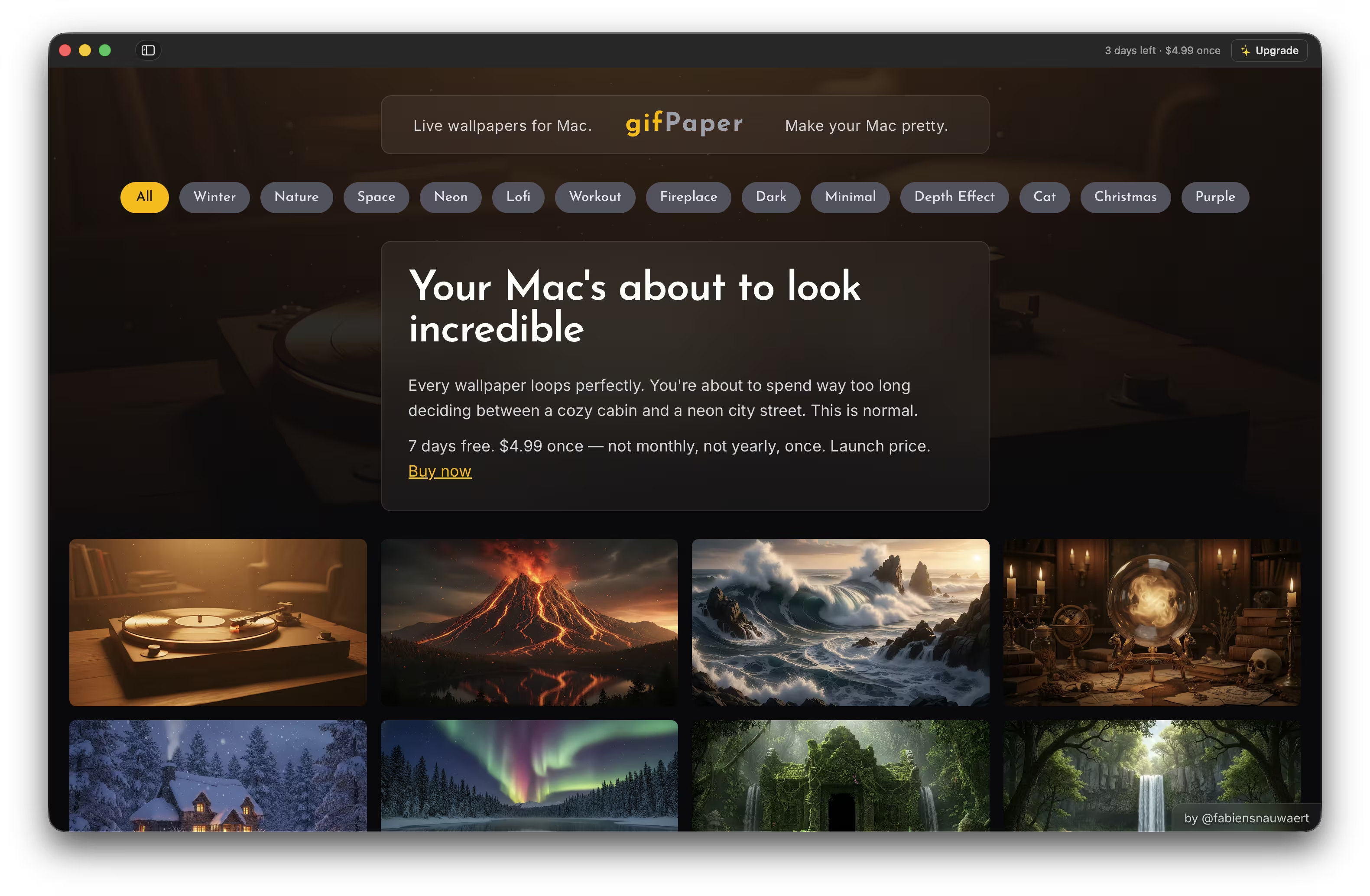
The app lives in your menu bar. Click the icon, browse by category, hover any wallpaper to preview it playing, click to set. No settings to configure, no files to manage.
One click to set. Forty-five minutes to decide which one.
A Field Guide to Procrastination Aesthetics
150 ways to avoid your actual desktop. All 4K. All loop seamlessly — no awkward jumps or cuts.
For Staring Thoughtfully Out Fake Windows
Rainy coffee shops. Train rides through Japan. Study desks that belong to someone with better habits than you. The whole lofi starter kit, minus the royalty-free hip-hop.
See also: Lofi · Cozy · Winter
For People Who Think Darkness Is a Personality Trait
Abandoned lighthouses. Mysterious towers. Things that glow ominously in shadows. If your Spotify Wrapped is 90% minor keys, you're home.
For Your 1987 Notebook Margins
Synthwave sunsets. Purple alleys. Neon grids stretching toward infinity. The aesthetic every bored teenager drew during math class. It's been waiting forty years to live on your lock screen.
See also: Neon · Purple · Cyberpunk
And Because Someone Always Asks
Fireplaces — From cozy cabin to Victorian gothic. More fireplaces than your average Airbnb listing.
Cats — Cats in neon. Cats by fireplaces. Cats doing cat things while you do human things.
Christmas — More snowglobes than any reasonable person needs.
Nature — Waterfalls, volcanoes, northern lights. The outdoors, safely behind glass where it belongs.
That's the tour. Browse all 150+ wallpapers → and find the one that speaks to whatever mood you're pretending to have today.
FAQ
Does it work on my Mac?
gifPaper requires macOS 26 (Tahoe) or later. To check: → About This Mac.
Running something older? Here's how to update macOS →
How does the free trial work?
7 days, all features, all 150 wallpapers. No credit card, no BS. After 7 days, purchase to keep using.
Does it work on the lock screen?
Yes — and this is the cool part. Your lock screen shows the animated wallpaper when you wake your Mac, then gently slows to a stop as you unlock. Exactly like Apple's own Aerial wallpapers. Same format, same behavior, just with wallpapers you actually chose.
Does it affect battery life?
Lock screen and screen saver: no. They only animate when your Mac is locked or idle.
Desktop: by default, it shows a static frame — beautiful, zero battery impact. You can toggle animated desktop mode if you want full video playback while you work, but it's off by default.
Can I add my own videos?
Not yet — you're choosing from the curated collection for now. Adding your own videos is coming soon.
Why isn't it on the Mac App Store?
Apple's sandboxing rules prevent App Store apps from modifying wallpaper settings. Apps distributed outside the store can — so that's what I do.
The app is notarized by Apple, meaning Apple has scanned it and verified it's free of malware. Your Mac, your wallpaper, your rules.
The Bottom Line
$5 once. Not monthly. Not yearly. Once.
The latte you're thinking about is $7 and gone in 20 minutes.
The wallpaper is yours forever. And loops forever. That's a very long time.
Free 7-day trial. No credit card. The hardest part is choosing which one.