7 Sources for a Perfect Plant Growth Timelapse Wallpaper
Your Mac deserves more than another drone shot. You want to watch a bean sprout burst into life on your lock screen, not another slow pan of a bridge that's already been photographed into the afterlife. There's something hypnotic about a plant growth timelapse. It takes slow biological drama and compresses it into something your impatient primate brain can enjoy.
The trick is finding footage that isn't mushy, badly lit, or edited like a science fair slideshow. Then there's the second problem. Getting that video onto your Mac in a way that doesn't feel like you've duct-taped a screensaver to your desktop.
Let's solve both.
If you're into photographing your own plants too, this helpful guide for plant collectors is a nice side road. For everyone else, here's the short list of places worth checking.
1. NatureFootage
NatureFootage is the grown-up option. If most stock marketplaces feel like a garage sale with a search bar, this one feels curated by people who actually care what leaves look like under a macro lens.
Its plant timelapse collection at NatureFootage leans hard toward documentary-grade material. That's useful if you want a plant growth timelapse that feels studied and intentional instead of generic "flower does flower things" filler.
Why it works
The big win here is quality control. Footage comes from professional nature cinematographers, and it usually shows. Color is cleaner, framing is more deliberate, and the clips tend to avoid that bargain-bin stock look where everything feels oversharpened and faintly cursed.
Licensing varies by clip, which is normal for higher-end libraries and mildly annoying for everybody else. You'll need to check whether a clip is rights-managed or royalty-free before you buy it.
Practical rule: If you're shopping for a wallpaper clip, preview the start and end frames first. Pretty footage isn't enough. If the clip begins and ends on wildly different compositions, you'll need to trim it or loop it creatively.
A few blunt notes:
- Best for: Documentary-style bloom, macro growth, and footage that can survive being full-screen on a Retina display.
- Watch for: Loop-readiness is inconsistent. A lot of clips were made for editors, not desktop wallpaper nerds.
- Skip if: You want the cheapest possible option and don't care if the footage looks a little anonymous.
NatureFootage is where I'd start if visual credibility matters more than bargain hunting. It doesn't hand you a perfect loop on a silver platter, but it gives you material worth the effort.
2. Pond5
Pond5 is the opposite approach. Massive catalog, lots of contributors, plenty of choice, and enough search filters to make you feel briefly powerful.
Its Pond5 plant growth timelapse footage search is useful when you want volume. You can sift by duration, frame rate, codec, and resolution, which matters more than people think when you're trying to build a loop that doesn't hiccup at the seam.
What Pond5 is good at
When options are what you're after, they abound here. Macro sprouting clips, blossoms opening, seedlings pushing up through soil, all the tiny green melodrama. There are a lot of near-loopable sequences if you're willing to preview carefully and trim with a little patience.
That filtering matters because a clean desktop loop isn't just about subject matter. It's about clip shape. Shorter clips with stable framing and consistent lighting are easier to repurpose than sprawling edits made for a documentary timeline.
The search tools are the product here. Use them well, and Pond5 feels efficient. Ignore them, and you're wandering a digital flea market.
A few no-nonsense recommendations:
- Use duration filters first: Short, self-contained clips are easier to loop cleanly.
- Check contributor consistency: Quality varies a lot because the marketplace is broad.
- Read the license terms: Marketplace convenience doesn't remove the need to verify usage.
Pond5 also has a free collection, which is handy if you want to test a few files before spending money. Just don't assume free means perfect. Free often means "good enough for a social post," which isn't the same thing as "pleasant to stare at for hours."
3. Artgrid
Some footage libraries are built for shoppers. Artgrid is built for people who care about image quality enough to use words like ProRes in casual conversation and not feel embarrassed.
The Artgrid homepage is worth a look if you want cinematic plant clips instead of stock that merely exists. Expect polished footage, strong color, and professional formats that hold up on high-resolution displays.
Why filmmakers like it
Artgrid's appeal is consistency. You don't spend as much time dodging bad taste. The catalog is cinematographer-led, and that usually means cleaner motion, better grading, and less visual chaos.
It also offers preview downloads, which is exactly what you want before committing to a subscription. Test the clip on your actual screen. A video can look lovely in a browser preview and weirdly flat once it's sitting behind your menu bar.
A few caveats matter here. Artgrid is subscription-based, not a single-clip store. If you only need one plant growth timelapse and then plan to disappear back into the woods, that may be overkill.
Where it falls short
The catalog is curated, not endless. That helps quality, but it also means ultra-specific species or hyper-scientific growth sequences may be thinner on the ground.
- Best for: Cinematic desktop backgrounds and polished lock screen videos.
- Less ideal for: Very niche species, lab-style footage, or one-off bargain shopping.
- Important detail: If you're planning any kind of redistribution beyond personal use, ask support to confirm the exact terms.
If your standards are annoyingly high, Artgrid makes sense. If your budget is equally annoyingly high, even better.
4. Adobe Stock
Adobe Stock is the sensible shoes option. Not flashy. Not obscure. Just broadly useful, professionally run, and very easy to fit into an existing design workflow.
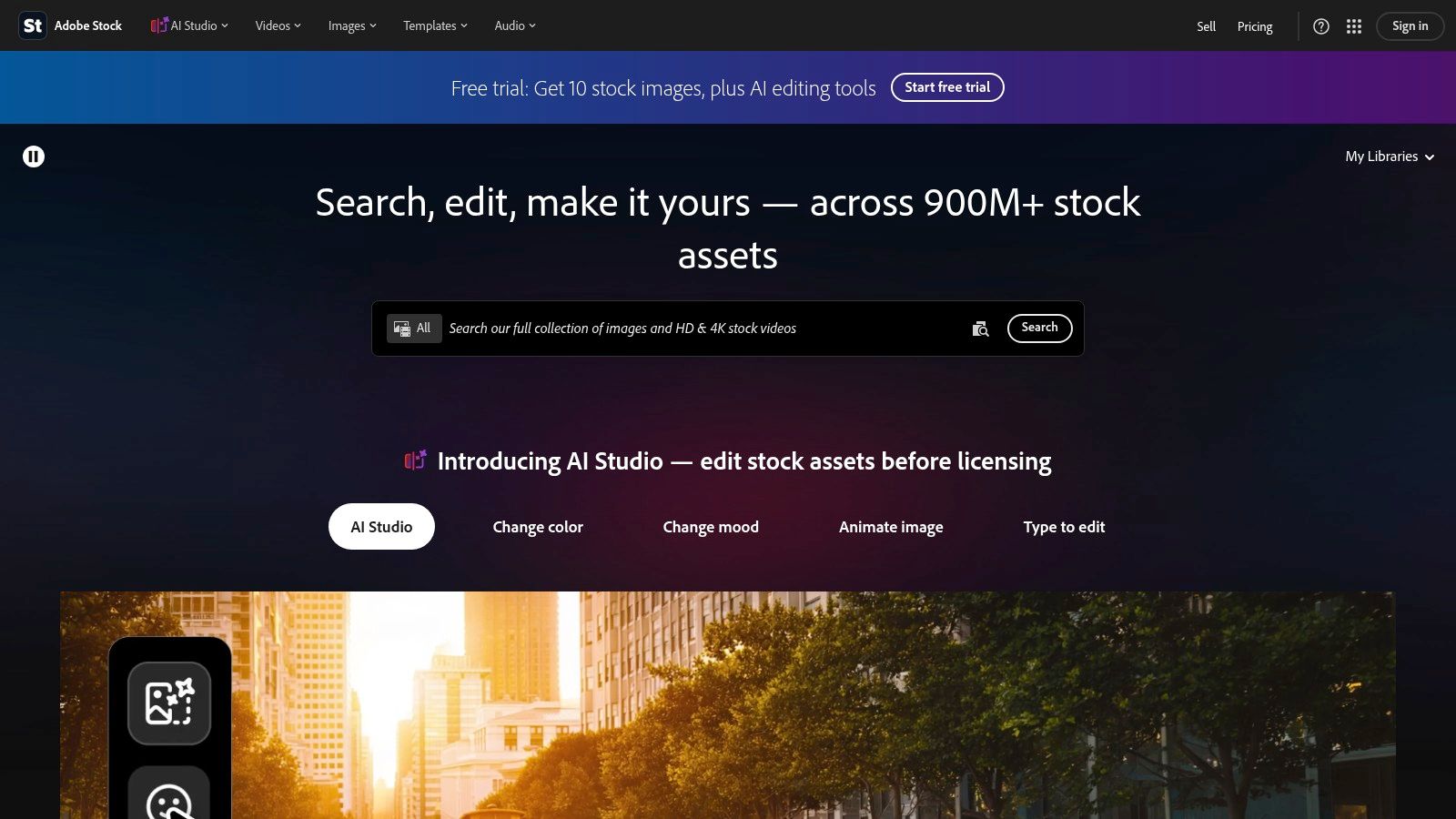
The Adobe Stock video library is a good middle ground if you want plant timelapse footage without adopting a whole new platform religion. Search filters for video, resolution, and duration make it manageable fast.
Why teams pick it
If you're already inside Adobe's ecosystem, this one is painless. Licensing is clearer than on some open marketplaces, purchase options are flexible, and it's easier to keep track of what you've licensed.
That matters if this project is more than "I found a nice sprout video and got emotionally attached." Adobe Stock is built for people who need order.
Worth remembering: A beautiful timelapse can still fail as a wallpaper if the lighting shifts too much between frames. Seamless loops live or die on consistency, not just subject matter.
That last part matters a lot with plant footage. Natural light is gorgeous right up until it jumps between frames and your loop starts blinking like a haunted conservatory. One Reddit discussion on avoiding jumps between cycles points to a real gap in most tutorials. They talk intervals, but not smooth lighting transitions or standardizing light exposure before shooting, which is why so many homemade timelapses look fine in theory and awkward in practice (discussion on day-night jump artifacts in plant timelapse).
Adobe Stock won't solve bad source footage, obviously. But it gives you enough filtering and enough reliable admin structure to find decent material without unnecessary drama.
5. iStock by Getty Images
iStock is where I'd go when I want a huge library and I'm willing to do some digging. It doesn't pretend every clip is precious cinema. That's good. Sometimes you just need a lot of plant options and a free afternoon.
The iStock timelapse plant growth video search is broad enough to cover macro bloom footage, microscope-style clips, and a range of visual moods from polished commercial green to full science-class petri dish energy.
The case for iStock
Volume helps when you're matching a specific desktop vibe. Maybe you want a saturated flower opening against black. Maybe you want a minimalist seedling sequence that won't fight with your icons. Big libraries make those choices possible.
iStock's royalty-free model is also easier to live with than rights-managed licensing if you're a normal human who doesn't enjoy reading terms for sport. Credit packs and subscriptions give you some flexibility too.
Still, you'll need taste. The library is large, and large libraries always contain things that make you ask who approved them.
- Good fit: Matching a color palette or finding a specific visual style without paying premium specialist-library prices.
- Main downside: Creative quality varies, so previewing is mandatory.
- Small warning: Some especially specialized scientific footage may live under Getty's broader ecosystem instead of iStock itself.
This is not the place for lazy browsing. It's the place for selective scavenging. If you're patient, you'll find excellent clips.
6. Science Photo Library
Some plant timelapses are pretty. Some are informative. Science Photo Library is where you go when you'd like both, with a slight bias toward "show me what the organism is doing."
The Science Photo Library collection has a more utilitarian search experience, but that's fine. You're not there for vibes. You're there for scientific imagery, microscopy, educational footage, and sequences that don't feel like they were assembled by someone whose brief was "green stuff, but elegant."
Why it's different
This library is strong when you want authentic plant movement, microscopic views, or lab-adjacent footage. If your dream wallpaper is less "romantic garden bloom" and more "botany department with good taste," this is your lane.
That authenticity matters because a real plant growth timelapse isn't just visual candy. Done properly, it's a measurement tool. Serious capture methods adjust intervals to species growth rates. Tomato plants, for example, can need a 10 to 15 minute interval during slow initial growth, then a 2 to 5 minute interval once budding and flowering begin, according to this plant growth timelapse methodology guide. That's why strong scientific footage often feels better paced. Somebody thought about the biology.
Some of the best plant videos don't just show growth. They respect how the plant grows.
Science Photo Library also offers editorial and commercial licensing, plus commissioning for bespoke sequences. That's more niche, but it's useful if you need something very specific and can't find it off the shelf.
The downside is obvious. Rights-managed scientific media can cost more, and the shopping experience is less polished than consumer stock sites. But for educational or rigorously accurate material, it's excellent.
7. Time-Lapse-Footage.com
You want a plant growth timelapse that looks like a film asset, not a random stock clip with a "nature" tag slapped on it. Time-Lapse-Footage.com is built for that job. It sells timelapse footage and little else, which is exactly why it works.
The featured plant growth clip at Time-Lapse-Footage.com shows the appeal fast. Clean composition, obvious subject movement, and delivery options that include ProRes HQ QuickTime files. Pricing is also refreshingly plain by resolution, which saves you from the usual stock-site scavenger hunt.
Why I like it for wallpaper use
This site has a real advantage for the angle of this guide. If your goal is not just finding footage, but turning that footage into a native Mac live wallpaper for your desktop and lock screen, a timelapse-first library gives you better raw material.
The clips are usually framed around motion progression, not just a pretty still scene that happens to move a bit. That matters. Strong desktop wallpapers need a clear subject, steady camera work, and motion that stays interesting after the third loop, not just the first five seconds.
You also spend less time fixing bad source material. Many general stock libraries bury you in clips that are technically fine but annoying to loop because the action starts late, the framing drifts, or the payoff happens in one awkward burst. Time-Lapse-Footage.com tends to be closer to usable out of the box.
If you want the faster route after downloading a clip, use it as source material for a Mac nature live wallpaper setup. That gets you from "nice footage file" to "my desktop looks good" without a side quest in overcomplicated editing software.
The tradeoff
The catalog is smaller. You are not shopping an endless marketplace, and there is no subscription buffet if you need dozens of clips.
Still, I would rather browse a focused library with good footage than wade through a giant pile of mediocre results. For cinematic plant growth timelapse, that trade is usually worth it. You get clearer licensing, high-quality downloads, and clips that are much easier to repurpose into polished desktop motion backgrounds.
Plant Growth Timelapse, 7-Provider Comparison
If you want footage that looks good as a finished video and still works as a native Mac live wallpaper, provider choice matters more than people admit. A giant library is useless if every clip needs trimming, color cleanup, or awkward loop surgery before it stops looking like a student project.
Use this table to pick based on the job, not the logo.
| Title | Implementation complexity | Resource requirements | Expected outcomes | Ideal use cases | Key advantages | Licensing / Cost |
|---|---|---|---|---|---|---|
| NatureFootage | Low. Simple download, may require trimming for loops | UHD/4K files, moderate storage and bandwidth | Documentary-grade plant and macro timelapses with high fidelity | Scientific documentaries, high-quality nature projects | Niche, curated plant timelapse collection with tight quality control | Per-clip pricing varies. Rights-managed and royalty-free options. Often pricier |
| Pond5 | Low. On-demand buying with detailed filters | Very large selection including 4K, varied codecs and formats | Mixed quality, many near-loopable clips available | One-off purchases, diverse creative projects, quick sourcing | Huge library and strong search tools. Free Collection available | Per-clip pricing. Contributor licensing varies, verify intended use |
| Artgrid | Medium. Subscription required, preview downloads available | High-end formats such as ProRes, RAW, and 8K. High storage and bandwidth | Consistent cinematic quality that holds up on high-resolution displays | High-end commercial and cinematic projects needing a uniform look | Cinematographer-led catalog with consistent image quality and broad commercial licensing | Subscription only. Broad commercial license, but check redistribution terms |
| Adobe Stock | Low. Flexible purchasing and team workflows | HD and 4K options, standard codecs, moderate storage | Reliable mid-to-high quality with organized license tracking | Design teams, marketing, corporate projects requiring clear rights | Clear rights management, multiple buying options, and useful team tools | Credits, subscriptions, or on-demand purchases. Premium 4K can get expensive |
| iStock by Getty Images | Low. Per-clip purchase or packs and subscription options | HD and 4K, including macro and microscope clips. Storage varies | Wide selection, with quality that depends on the contributor | Budget-conscious sourcing, matching specific looks or palettes | Very large library and straightforward royalty-free terms | Royalty-free licensing. Credit packs and subscriptions can lower cost |
| Science Photo Library | Medium. Specialized search, commissioning available | Scientific and microscopy formats, may need expert handling | Scientifically accurate, education-grade footage | Educational, scientific, lab, or microscopy content, including commissioned shoots | Scientific accuracy, expert contributors, and custom shoot capability | Often rights-managed. Editorial and commercial options available. Generally higher cost |
| Time-Lapse-Footage.com | Low. Focused timelapse shop with direct downloads | ProRes 10-bit HQ QuickTimes, significant storage needs | Loop-friendly, high-quality timelapses that need little trimming | Smooth desktop loops, wallpaper, and timelapse-specific projects | Timelapse-specialist catalog, transparent per-clip pricing, and ProRes HQ files | Per-clip pricing only. Royalty-free perpetual license. No subscription |
A blunt recommendation. If you need the widest shopping aisle, start with Pond5 or Adobe Stock. If you care more about cinematic consistency, Artgrid is the better bet. If your real goal is turning plant footage into a polished Mac desktop or lock screen background, Time-Lapse-Footage.com and NatureFootage are usually the least annoying places to start.
That last point is the one people skip. A clip can be beautiful and still make a lousy wallpaper. You want controlled motion, stable framing, and footage that still looks intentional after the tenth loop. That is why a smaller, timelapse-first catalog often beats a giant marketplace full of almost-right files.
Give Your Mac a Green Thumb
Your Mac sits in front of you all day. Give it something better to do than glow with another dead-static wallpaper. A plant growth timelapse gives you motion that belongs on a desktop. Leaves unfurl, stems reach, shadows shift. It feels alive without turning your screen into a casino billboard.
That matters more than people admit.
If you want a plant clip that works as a live wallpaper, stop judging it like a normal video. Cinematic footage can still fail on a desktop. You need stable framing, controlled motion, clean lighting, and a loop that still looks intentional after hours of repeat playback. The best source is not automatically the biggest library. For this job, footage quality and wallpaper behavior matter more than endless search results.
If you plan to shoot your own, keep the setup boring. Boring gets better results. One practical guide on plant timelapse setup guidance recommends locked camera settings, steady artificial light, and warm indoor conditions so your footage does not flicker and your plant does not hate you halfway through the shoot. That advice is more useful than another overproduced tutorial full of dramatic B-roll and zero specifics.
Plant imaging has also moved well past simple visual recording. Researchers working on computer vision and time-series plant monitoring are combining imagery with environmental and physiological data to track plant stress. You do not need that level of obsession for a lock screen, but the larger point holds. Good plant footage is useful because it captures gradual change clearly, and that same quality makes it great for desktop motion.
If you would rather skip the camera rig and go straight to results, use one of the footage providers above, then turn the final clip into a native Mac wallpaper with gifPaper for Mac. It is a much better move than settling for some clunky workaround that breaks the second macOS gets moody. The app uses Apple's native Aerial wallpaper format for your desktop, lock screen, and screen saver. There is a 7-day free trial, no credit card, and the full app is a one-time $4.99 purchase.
If you need practical plant advice outside the video side, Leaves & Soul's plant care insights are worth a read.
gifPaper is the clean way to turn a good video file into a proper Mac live wallpaper instead of a half-broken desktop hack. You can browse 150+ looping 4K wallpapers with ambient music, or bring your own clip and make it feel native on macOS. The app is notarized by Apple, supports desktop, lock screen, and screen saver use, and keeps the whole thing simple. As it should.