
7 Summer Wallpapers for a Digital Vacation
It's 85 degrees out. The sun is shining. You are inside, looking at a spreadsheet. Your Mac's wallpaper is a tastefully abstract swirl. It's fine. It's just not helping.
You're going to stare at this screen for the next eight hours anyway. Might as well make it a view worth looking at. Summer wallpapers should feel like a tiny act of self-respect, not a punishment involving blown-out JPEGs, harsh colors, and a loop that ends with a visible hiccup like a fish flopping on a dock.
That's the weirdly useful part of this category. People keep searching for summer wallpapers, yet a lot of the existing results point toward physical home decor instead of digital backgrounds. One writeup on summer wallpaper ideas is mostly about interiors, which tells you why desktop users keep getting sent to fruit-print walls instead of actual screens worth using. If you work remotely, that gap gets silly fast. Even articles on work-life balance start making more sense when your desktop stops looking like a tax software login screen.
Let's trade the corporate gradient for a tiny, digital vacation. Here are seven summer wallpapers that bring the vacation to you, no PTO request required.
1. Calm Tropical Beach
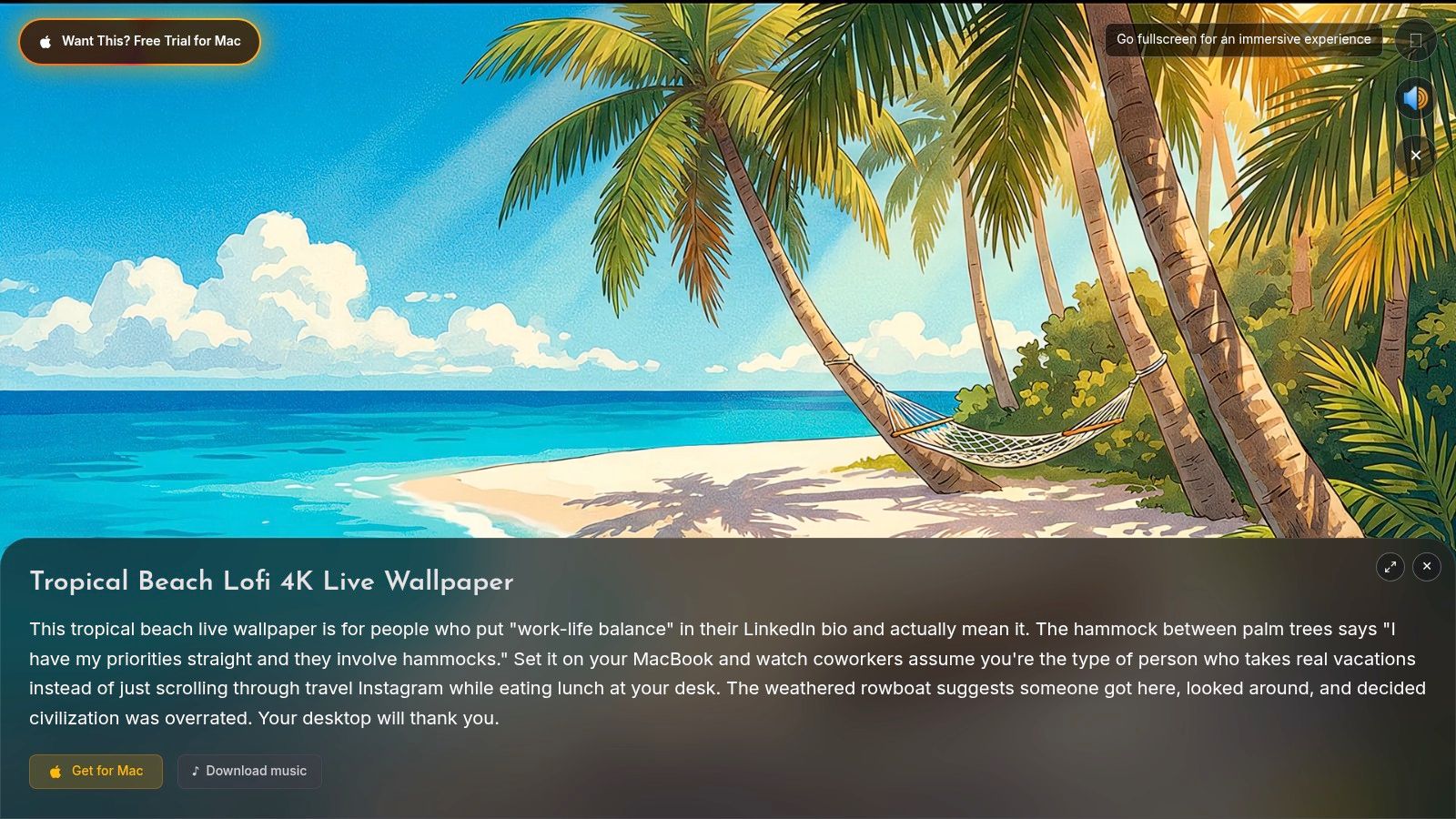
The obvious pick is often the obvious pick because it works. A beach loop with gentle surf, pale sand, and a sky that looks almost rude in its confidence is still the cleanest way to make your Mac feel less like a filing cabinet with a battery.
If you want the desktop equivalent of exhaling through your nose and pretending you're handling life magnificently, this is it. The motion stays slow, the horizon stays stable, and the whole thing reads instantly on a lock screen. Wake the Mac, see ocean, forget email for three glorious seconds.
What works and what doesn't
The practical part matters more than the beach fantasy. Summer scenes are bright by nature, so they can wreck icon visibility if they're too busy or too high-contrast. This one gets away with it because the movement is subtle and the composition is familiar. You don't have to "figure out" what you're looking at.
Practical rule: Pick beach wallpapers for the lock screen first. Decide later if you want full animation on the desktop. Bright motion is lovely when you unlock the Mac, but not every bright scene earns all-day desktop duty.
A few specifics make this one easy to recommend:
- Features: Continuously looping 4K video, toggleable ambient wave sounds, optimized for Retina displays
- Pros: Universally relaxing, calm movement, and very good at making a laptop open in public look suspiciously more expensive
- Cons: A little cliché if your taste runs toward art-school chaos, and bright sand can wash out icons
For more sea-and-sky options, the ocean wallpaper collection is the natural rabbit hole. You can also preview the wallpaper directly on its Calm Tropical Beach page.
A quick look helps:
2. Lofi Summer Train Window
This one goes in a completely different direction. No beach. No pool. No heroic saturation. Just the deeply civilized fantasy that you are on a summer train ride through soft green countryside instead of arguing with a formula.
The lofi summer train window works because it understands restraint. The palette stays soft, the motion feels continuous, and the illustrated style keeps it from tipping into "stock travel video playing in a dentist waiting room."
Best for focus people and fake poets
I'd use this for desktop before lock screen. It's easier on the eyes over long stretches, especially if your day includes writing, reading, coding, or a respectable amount of staring into the middle distance while pretending to think.
Quiet movement beats loud color when the wallpaper has to live behind real work for hours.
The trade-off is simple. If you love cinematic realism, this won't scratch that itch. It's an illustration, and proudly so. If you already like the whole late-afternoon train, headphones on, emotional but functional vibe, you'll probably adore it.
- Features: Hand-animated illustration, endless loop with no visible seam, soft colors that stay readable behind icons
- Pros: Great focus background, distinctive look, and easier desktop legibility than many summer wallpapers
- Cons: Not everyone wants illustration on a premium Mac display, and yes, the girl who's always studying would absolutely approve
If that mood is your thing, the lofi aesthetic guide explains why this style keeps swallowing entire corners of the internet. The wallpaper itself lives on the Lofi Summer Train Window page.
3. Sunset Overlook
Some wallpapers whisper. This one arrives wearing a cape.
A painterly sunset over a mountain overlook is the high-drama option in this list. Clouds drift slowly, the sky moves through those impossible evening colors, and your Mac suddenly looks like it has opinions about cinema.
The Retina test
This kind of wallpaper only works if the source quality holds up. That matters more on Mac than people realize. High-resolution displays are ruthless. Grain, compression, awkward loops, all of it gets exposed immediately. One reason modern live wallpaper apps have a real audience is that Mac users have gotten pickier about quality. Over 70,000 Mac users have adopted apps for 4K video wallpapers, and 66% value ease of use and 25% prioritize digital wellbeing, which helps explain why calming ambient visuals keep winning.
That context fits this wallpaper perfectly. It's bold, but the movement stays slow enough that it doesn't feel like your desktop is trying to perform at you.
- Features: Real 4K footage, strong color grading, slow cloud movement, a long loop designed to feel natural
- Pros: Gorgeous on Retina displays, rich color, and excellent if you want your Mac to make a first impression
- Cons: It's vibrant enough to distract some people, especially on a full desktop
You can preview it on the Sunset Overlook wallpaper page.
Later in the day, this kind of scene really shows off:
4. Firefly Meadow
Summer isn't always noon and chlorine. Sometimes the best version of summer is a dark field at twilight with tiny points of light doing their patient little dance while you answer exactly one more email and then definitely stop. Probably.
Firefly Meadow is the dark-mode pick. It swaps bright scenery for a nearly black background and floating, pulsing light. The result feels calm in a different way. Less "vacation brochure," more "late summer evening when the air finally stops arguing with you."
Why dark summer wallpapers punch above their weight
This is one of the easiest wallpapers to live with all day. The visual activity stays contained, and your icons don't get lost. If you work at night, or just prefer your desktop not to shout, this kind of scene makes more sense than a blazing beach at 2 p.m.
There's also a quality point hiding here. A lot of people reject digital summer backgrounds because they look compressed, dated, or visibly cheap on high-resolution screens. That gap exists because premium displays expose the difference between a rushed render and something built to last. A clean dark loop often feels better than a louder wallpaper with bad edges and obvious repetition.
Small warning: Subtle wallpapers age better. The scene that makes you gasp on day one isn't always the one you still want behind Finder on day ten.
- Features: True black background, non-repeating firefly patterns, light resource use
- Pros: Excellent with dark mode, easy for all-day use, and gentler on battery than a blindingly bright summer scene
- Cons: Too subtle if you want immediate wow, and it can feel a bit solitary if your taste leans more cheerful than tranquil
The wallpaper is available on the Firefly Meadow page.
A quick preview:
5. Shimmering Poolside
Pool water is one of the great visual scams. It's basically light moving around in a geometry lesson, yet the human brain sees it and immediately thinks, yes, this would fix me.
Shimmering Poolside is for people who want summer wallpapers to feel clean and modern rather than picturesque. Top-down pool scenes have an advantage over beaches and sunsets because they're semi-abstract. You get motion, brightness, and that refreshing summer look, but without a crowded composition fighting your desktop icons.
Best if you like minimal with a pulse
This is the easiest bright wallpaper on the list to pair with a design-heavy setup. Minimal dock, neat folders, probably a browser with too many pinned tabs. The refractions do the work. You don't need extra visual clutter.
- Features: Hyper-realistic 4K render, precise light refractions, continuous loop
- Pros: Modern, optimistic, and strangely hypnotic in a good way
- Cons: It's extremely bright, and yes, there is a real risk of wanting to abandon your responsibilities and look up flights
The wallpaper page is Shimmering Poolside.
This one gives you the idea fast:

6. Campsite Fire
Summer night beats summer day more often than the tourism industry would like to admit. Campsite Fire understands this. It goes for warmth, darkness, embers, and that specific outdoor coziness that makes every conversation feel more meaningful than it probably is.
This is the anti-beach wallpaper. It works best when your room is dim, your menu bar is dark, and you want the screen to feel less sterile. If you already like the cozy aesthetic, this one lands immediately.
Where it fits best
I like campfire wallpapers most as a lock screen or screen saver. They're atmospheric enough to feel special when the Mac wakes up, and the darker background gives text and icons room to breathe. The optional crackling audio is fun at home, less ideal if you're in a shared office and don't want coworkers wondering why your laptop sounds like a woodland ritual.
A wallpaper can be technically perfect and still wrong for the room you're in. Audio is the clearest example. Great alone. Situational in public.
- Features: Ambient crackling audio, realistic smoke and embers, deep dark background
- Pros: Cozy, comforting, and a strong summer-night alternative to the usual beach formula
- Cons: Not a daytime summer scene, and the audio won't suit every environment
You can preview it on the Campsite Fire wallpaper page.
Here's the visual:
7. Melting Popsicle
And now for art. Or nonsense. The line is thin and pleasantly sticky.
A melting rocket pop on hot pavement is not the normal answer to "best summer wallpapers." That's exactly why it belongs here. It's funny, slightly tragic, bright without being busy, and weird enough that no one will mistake your desktop for a default theme.
The case for choosing something odd
Summer wallpapers are often played safely. Beach. Palm tree. Sunset. Nice choices, all of them. But the oddball pick can age better because it has a point of view. This one feels more like a tiny visual joke than a generic seasonal image.
There's also a broader reason more people are taking desktop visuals seriously. The computer wallpaper software market is valued at USD 1.4 billion in 2024 and is projected to reach USD 3.8 billion by 2033. That doesn't mean everyone wants absurdist dessert tragedy on their Mac, but it does mean desktop aesthetics have escaped the "nobody cares" stage.
- Features: Carefully animated dripping motion, bold primary colors, smooth looping timing
- Pros: Unusual, funny, and surprisingly good for icon visibility
- Cons: It may confuse authority figures, and it carries a faint emotional note of "summer is temporary," which is either poetry or a lot for 10 a.m.
You can see it on the Melting Popsicle wallpaper page.
A still preview:
7-Scene Summer Wallpaper Comparison
| Title | Implementation Complexity | Resource Requirements | Expected Outcome | Ideal Use Case | Key Advantages |
|---|---|---|---|---|---|
| Calm Tropical Beach | Medium, 4K loop with optional audio | Moderate, 4K video + ambient sound may use GPU and battery | Relaxing, serene mood; quick visual reset | Lock Screen | Universally calming; slow motion minimizes distraction |
| Lofi Summer Train Window | Medium, hand-animated parallax | Low–Moderate, lightweight animation, soft palette | Focused, nostalgic atmosphere conducive to deep work | Desktop | Subtle motion for focus; muted colors preserve icon legibility |
| Sunset Overlook | High, color graded real 4K footage | High, vivid 4K footage requires GPU and brightness | Dramatic, uplifting visuals; attention-grabbing | Lock Screen or Screen Saver | Striking, premium look; rich colors on Retina displays |
| Firefly Meadow | Low, procedurally generated twinkles | Low, true-black background, resource-light | Calm, magical, low-contrast evening mood | Desktop (dark mode) | Excellent for dark mode; minimal battery impact; non-repeating |
| Shimmering Poolside | High, hyper-real 4K render and 60s seamless loop | High, bright, detailed render may increase power use | Refreshing, minimal, invigorating vibe | Lock Screen | Modern, stylish, mesmerizing light patterns |
| Campsite Fire | Medium, particle smoke + ambient audio | Moderate, particle physics and audio output | Cozy, warm, slightly nostalgic mood | Screen Saver | Highly cozy and comforting; realistic audio/embers |
| Melting Popsicle | High, frame-by-frame 4K animation | Moderate, detailed animation but limited motion range | Quirky, bittersweet, attention-grabbing | Desktop (conversation starter) | Unique, humorous/existential appeal; strong icon contrast |
How to Stop Dreaming and Start Watching
Picked your perfect digital escape? Good. Installing it is easier than convincing your boss that ambient research at the beach counts as a work expense.
All of these live wallpapers run on gifPaper for Mac. That's the part that makes this more than a gallery of pretty loops on a website. The site has a curated collection of 150+ continuously looping 4K live wallpapers with ambient music, free to browse, and the app is what sets them as your Mac lock screen, desktop, and screen saver. It's also the first and only app that uses Apple's native Aerial wallpaper format, the same system Apple uses for its own video wallpapers, rather than a weird overlay pretending to be part of the operating system.
That native piece matters. Apple brought its own Aerial video wallpapers into macOS Sonoma and later as cinematic lock screen animations and matching desktop imagery, which set the standard for how this should feel when it's done properly. Older Mac tools for animated wallpapers were much clunkier. The classic approach used unsupported preference panes and sometimes required manually launching the app or quitting the agent in Activity Monitor if it failed to load.
Here's the deal:
- 7-day free trial: You can try every wallpaper and feature with no credit card required.
- $4.99 one-time purchase: It's a launch price, not a subscription. You buy it once.
- 30-day money-back guarantee: Enough time to find out whether your Mac should become a beach, a meadow, or a very concerning popsicle.
- Simple setup: Download the app directly, open it, choose a wallpaper, click Set Wallpaper, done. One action sets the same wallpaper on the lock screen and desktop.
- Mac requirements: It requires macOS 26 Tahoe or later, and it's distributed directly because Apple's sandboxing prevents live lock screen wallpapers through the Mac App Store. The app is notarized by Apple.
If you want more ambient options beyond this summer list, the nature wallpaper collection and lofi wallpaper collection are easy places to keep browsing. And if all this visual escapism inspires a real one, sure, go look at actual beach destinations. Your Mac can come back as a beach even if you don't.
If your screen is going to occupy a large chunk of your waking life, it might as well earn the privilege. gifPaper gives your Mac a proper live lock screen, desktop, and screen saver using Apple's native system, with a 7-day free trial, a $4.99 one-time purchase, and none of the cursed 2003 GIF energy. It's a slightly absurd thing to care about. It's also completely correct.