Moon Phases Wallpaper: Stunning Designs for Your Desktop
It is 2:17 p.m., you have twelve windows open, Slack is misbehaving, and your desktop peeks through for half a second. That is exactly when a wallpaper earns its keep. A good moon phases wallpaper makes the Mac feel composed instead of cluttered, which is a ridiculous thing to care about until you spend eight hours a day looking at the thing.
The problem is not a shortage of moon images. The internet is full of moons. The problem is source material. A lot of it is soft, overedited, cropped for phones, or designed for people who want their laptop to resemble a crystal shop checkout counter. Nice in theory. Less nice on a Retina display.
A moon phases wallpaper works because the subject already has structure. The phases repeat on a real cycle, so the desktop feels intentional instead of randomly atmospheric. That matters more than it sounds. Good wallpapers should calm the background without turning your Mac into a vision board.
This guide focuses on where to get the raw ingredients. Some sources are scientific and extremely clean. Some are artist-made and better at mood than accuracy. Both can work. The trick is knowing whether you want faithful lunar phase imagery, a polished illustration pack, or footage you can turn into motion using tools like gifPaper for moon wallpaper setups.
There is room for taste here. There is also room for standards. If you want something a little mystical on the desk, fine. Even pink amethyst crescent moon decor has its audience. But for a Mac wallpaper, I would still rather start with a strong source file and decide how dreamy to get afterward.
1. NASA Scientific Visualization Studio
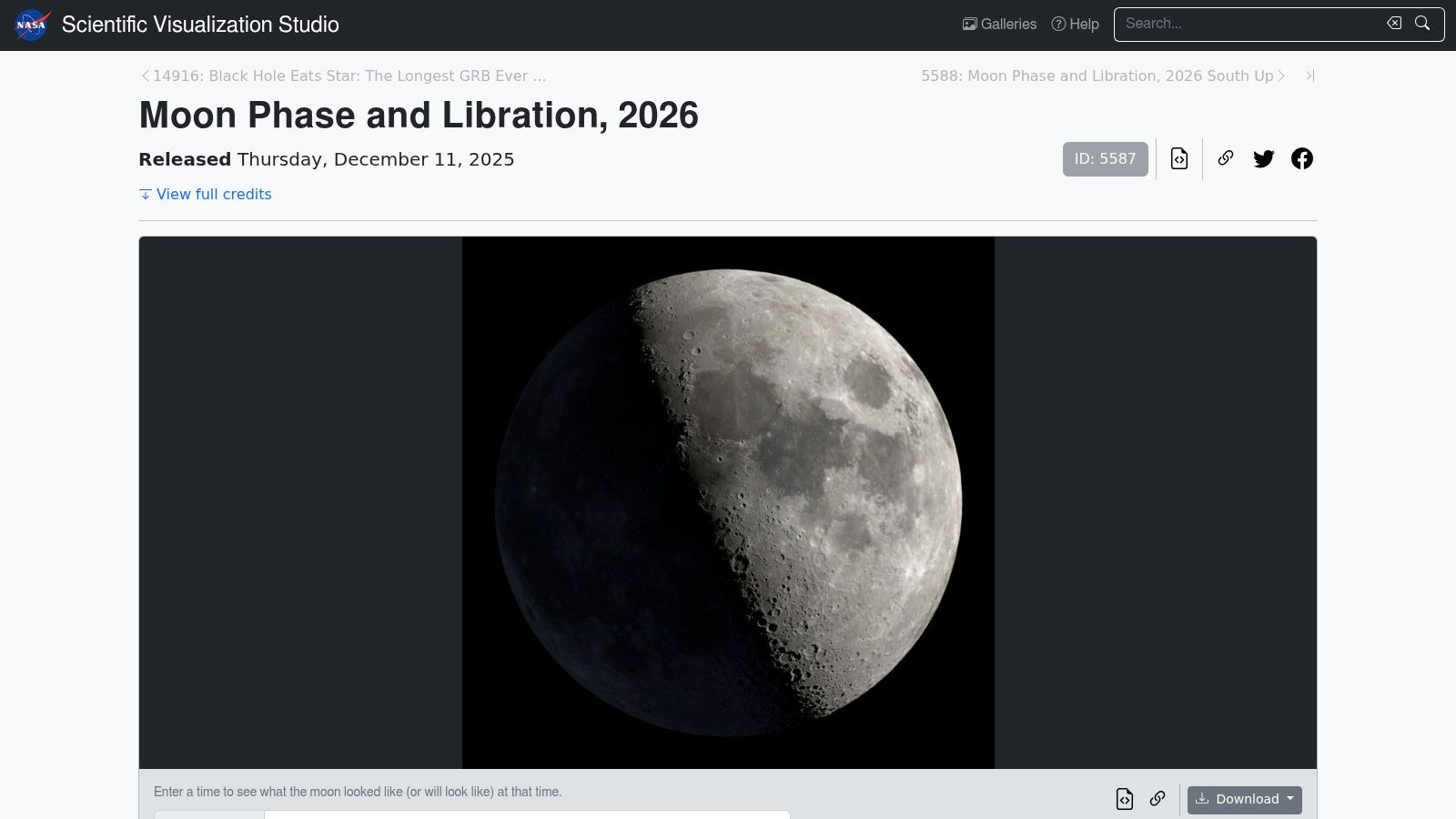
Open your Mac at 9:12 a.m., half awake, coffee doing very little, and the desktop is either helping or hurting. A clean lunar sequence helps. A blurry moon collage with fake glow effects looks like the wallpaper equivalent of buying a nice suit and wearing novelty socks with sandals. If you want source material with zero nonsense, start with NASA Scientific Visualization Studio.
NASA's advantage is simple. The visuals are built from observation and simulation work, so the Moon keeps its actual surface detail, phase progression, and libration instead of turning into generic "space vibes." That makes these files unusually good raw material for a moon phases wallpaper. You are not just downloading a pretty image. You are getting assets that can support a static desktop, a timed wallpaper set, or a short motion loop without falling apart on a Retina display.
A useful option for Mac setups is NASA's portrait-oriented Moon-only sequence for 2025. Portrait sounds oddly specific until you try fitting lunar imagery onto a desktop and realize how much junk usually surrounds the subject. This version gives you a cleaner cut of the Moon itself, which is much easier to crop for a centered wallpaper, a side-aligned composition, or a vertical monitor if you are one of those people with a desk setup that looks like a small trading floor.
What works well
Detail, consistency, and flexibility.
These assets hold up because they begin life as scientific visualizations, not social media leftovers compressed six times before landing on a wallpaper site. If you want a still, pull a frame with the phase and orientation you like. If you want movement, trim a short segment and turn it into a looping desktop or lock screen using a dedicated space wallpaper setup for Mac or the existing moon wallpaper collection for Mac.
NASA is also one of the few sources here that gives you material worth editing. That matters. Good wallpaper hunting is really source hunting. The final desktop often looks better when you crop, slow, darken, or isolate one excellent NASA asset than when you download a finished wallpaper somebody already overcooked.
Practical rule: Treat NASA files like master footage. Pull the phase, framing, or clip you want, then build the wallpaper around that.
Trade-offs
NASA's site is not designed for people chasing desktop aesthetics on a Tuesday night. It is designed like a government archive run by smart people who assume you can read filenames and enjoy codec decisions. File sizes can be heavy, variants are easy to mix up, and the full-year animations are better as source footage than as ready-made wallpaper loops.
That trade-off is still worth it. If realism matters, or if you want the cleanest possible base before adding style later, this is the strongest place to begin. It is nerdy in the best way, and yes, that does happen to look better.
2. Wikimedia Commons
Wikimedia Commons is the fast lane for people who want NASA's lunar animation without rummaging through a space-agency filing cabinet. The specific Moon phase and libration 2026 file on Wikimedia Commons gives you a direct-download style experience, plus a preview so you can make sure you're not downloading the wrong orientation and then pretending that "south up" was an artistic choice.
This route is especially handy if your goal is simple. Download one master file. Transcode if needed. Set it up. Done. No wandering through nested asset pages while questioning your life choices and your codec literacy.
Why this one is easier
Wikimedia is less romantic than NASA's site, but more convenient. If you want a single moon phases wallpaper video file to test quickly, this is usually faster.
That convenience matters because moon imagery often falls into two different camps. Minimal monochrome decor, and astronomy-inspired cycle tracking. Existing results often mash those together, which is why practical guidance is scarce. NASA's own visualizations make the second camp feel much more intentional than the average decorative phase row, and a good space wallpaper collection pairs nicely with that look if you want a broader cosmic desktop theme.
Verify the orientation before you commit. A moon animation can look majestic, or it can look like your desktop has developed opinions.
Trade-offs
The downside is the same thing that makes Commons useful. There are variants, filenames, and encodes, and not all of them are the one you meant to grab. If you don't check resolution, format, and orientation first, you can end up doing unnecessary cleanup work.
Still, for speed, Wikimedia is hard to beat. It's the practical person's NASA.
3. Dynamic Wallpaper Club
If full-motion lunar video feels like too much, Dynamic Wallpaper Club sits in a sweet spot. It offers native-style dynamic wallpapers for macOS, including moon-themed sets that change over time instead of running continuously.
That sounds less glamorous than video. On a Mac, it often looks better. A subtle change through the day feels built-in, not bolted on. You get atmosphere without turning your desktop into a tiny planetarium that competes with your open windows.
Native-feeling Mac aesthetics
This is a good choice for people who want the moon phases wallpaper vibe, but not constant animation. It behaves more like macOS design language. Quiet, polished, slightly smug.
It also solves a practical problem that a lot of search results ignore. A wallpaper can look excellent in a thumbnail and then crop awkwardly on a wide desktop. Guidance around real Mac display behavior is thin, which is why a setup guide like how to use dynamic wallpaper on Mac is more useful than another gallery full of mystery JPEGs.
- Best fit: People who want gentle time-based changes instead of looping motion.
- What it nails: Native macOS feel, especially on dark desktops with minimal icons.
- What it doesn't do: Actual lunar phase tracking in a scientific sense. This is mood first, astronomy second.
Trade-offs
The downside is simple. Dynamic wallpapers switch between images. They don't animate continuously like video, and they don't give you a literal moving phase sequence.
Occasional macOS quirks can also interfere with switching behavior. That's not unique to this site. It's part of the native dynamic wallpaper experience. Very elegant. Slightly temperamental. Much like Macs.
4. Unsplash
You download a gorgeous moon wallpaper, set it, clear your desktop, and feel briefly superior. Then Monday happens. Two Finder windows open, a stack of screenshots appears in the top right, and the lunar masterpiece turns into expensive-looking clutter. That is the Unsplash experience in one scene.
Unsplash's moon phase search is strong on taste. If you want restrained black backgrounds, clean phase rows, grainy telescope shots, or celestial compositions that look like they belong on a very self-serious designer's MacBook, it delivers. The problem is that Unsplash is built to help images win at first glance, not to help wallpapers survive daily desktop use.
That trade-off matters more with moon phases than with a mountain photo. Phase-based art usually relies on spacing, contrast, and empty areas doing real compositional work. If the moons sit dead center and your menu bar, desktop labels, or app windows cut through the sequence, the whole thing stops looking intentional. It starts looking like you lost a fight with your own screen.
What to cherry-pick
Use Unsplash for source material, not blind final picks. The strongest candidates usually have three traits: wide framing, generous negative space, and enough contrast to hold up in Dark Mode without swallowing icon labels.
Search terms help. "moon phases black background" and "lunar calendar minimal" usually produce better desktop candidates than broader moon searches, which drift into travel photography and moody night skies. Beautiful images, wrong job.
A good Unsplash find also gives you room to adapt. Static phase strips can be cropped into cleaner desktop layouts. Single moon shots can become part of a custom composition. Short moon clips or timelapse-style assets you find elsewhere can pair well with the same visual style if you plan to turn the setup into motion later with a tool like gifPaper. That is the bigger point here. Unsplash is one ingredient, not the whole dinner.
The best Unsplash moon wallpaper is usually the one with the most empty space, not the one screaming for attention in the search grid.
Trade-offs
Curation is better than the average wallpaper dump site. Resolution consistency for actual desktop use is worse than it looks from the thumbnails. Some files feel perfect on a Mac. Others are clearly made for social crops, poster mockups, or general inspiration boards.
You also get very little guidance about licensing nuance, alternate crops, or how an image behaves across different displays. So yes, Unsplash is useful. It just works best for people willing to edit, test, and reject a few pretty failures first. Which, frankly, is the normal price of having a desktop that looks good instead of merely moon-themed.
5. Alpha Coders
Open Alpha Coders on a Mac after ten minutes of scrolling tasteful portfolio sites and the mood changes fast. Less gallery wall, more "someone designed this to fit a monitor." For moon phases wallpaper, that practicality is useful.
Alpha Coders' moon phases section is one of the better places to hunt for ready-to-use desktop files when you care more about fit than prestige. You get a messy mix of photographic moon shots, phase-strip graphics, space art, and older fandom-adjacent wallpaper culture. Some of it is distinctly uncool. Some of it works shockingly well once it is full-screen and your menu bar is no longer fighting for its life.
Best for exact-fit hunting
Alpha Coders earns its spot because it respects screen sizes. Resolution filtering is the whole appeal here. If you are trying to avoid awkward cropping on an ultrawide, a 5K display, or some slightly cursed external monitor setup, this site gives you more usable starting material than prettier sources often do.
That matters with moon phase compositions. Rows of phases need spacing. A single moon needs negative space in the right place. Text overlays, giant planet renders, and overworked nebula effects ruin that balance fast, so filtering by size first saves time and reduces the number of dramatic thumbnail disappointments.
It also fills a gap in the source-material stack for this article. NASA gives you accurate raw assets. Artist packs give you polish. Alpha Coders gives you a big pile of desktop-shaped candidates you can test, crop, and, if needed, turn into something better. A static phase image from here can become a cleaner custom wallpaper in five minutes. A sequence-style image can also serve as a visual reference if you plan to build a motion version later with gifPaper.
- Good choice: You want a static wallpaper that already matches your display closely.
- Less good: You want consistent taste, licensing clarity, or a carefully curated aesthetic.
- Watch for: Corny fonts, heavy sharpening, fake star fields, and edits that smell faintly of 2012 forum signatures.
Trade-offs
Alpha Coders is a volume play. That is both the strength and the tax. You can find something that fits almost perfectly, but you will sort through plenty of wallpapers that look better as nostalgic internet artifacts than as a desktop you stare at all day.
Still, I would rather dig through a site that understands screen resolutions than one that hands you another gorgeous moon image clearly designed for a phone lock screen or a wall print. A wallpaper does not need to be high art. It needs to survive daily use without making your Mac look like it installed its own personality.
6. Zedge
Zedge's moon phases wallpaper results are chaotic in a way that can be either useful or terrible, depending on your tolerance for mobile-first design. If you want witchy graphics, AMOLED-black backgrounds, glittery crescent iconography, or something that looks like a sleep playlist cover, Zedge has range.
The problem is that a lot of that range belongs on a phone. A desktop is less forgiving. What looks crisp and punchy on a vertical screen can turn into a stretched, cropped mess on a Mac.
When Zedge is worth the hassle
Zedge is good for vibe hunting. Not precision. If you haven't decided whether you want your moon phases wallpaper to feel scientific, minimal, gothic, or vaguely enchanted by an online crystal shop, this is a fast way to sample styles.
That split in user intent matters. Moon phase wallpaper isn't one aesthetic. It usually falls into either minimal monochrome decor or astronomy-inspired cycle tracking. Existing pages tend to flatten those into one bucket, and Zedge exaggerates that problem by throwing every possible mood into the same pile.
If the wallpaper looks excellent on a phone mockup, assume nothing. Your desktop is larger, harsher, and deeply uninterested in excuses.
Trade-offs
Expect to crop. Expect to reject a lot. Expect some listings to be much better as inspiration than as final desktop assets.
Still, if you want bold style experimentation before settling on a more polished source, Zedge is useful. Just don't let it convince you that "busy but mystical" and "good desktop wallpaper" are the same thing.
7. Etsy
If free platforms keep giving you the same recycled moon row on black, this Etsy moon wallpaper pack listing shows the other path. Independent artists sell coordinated lunar packs with actual style choices. Better palettes. Better spacing. Better odds that your desktop won't look like a default astrology app screenshot.
Etsy is where moon phases wallpaper starts feeling designed, not merely found. That distinction matters more than people admit. You're going to look at this thing constantly. It's allowed to have taste.
Why paid packs can be better
Designer packs tend to solve the annoying details that free sources ignore. Multiple aspect ratios. Matching lock screen versions. Colorways that don't obliterate icon visibility. Some even understand that a wallpaper can be moody without making your entire display unreadable.
That historical continuity behind moon imagery helps here, too. Lunar phase timing has been standardized across modern ephemeris use for centuries, and long-range records go much deeper than that, which is why moon-phase design doesn't feel like a passing trend. It has the visual authority of something people have tracked, organized, and recognized for a very long time.
Trade-offs
Etsy is only as good as the seller. You have to read listings carefully, inspect previews, and make sure the file set matches your display. Licensing also varies, so if you need anything beyond personal use, check before downloading.
For a lot of people, though, this is the nicest static option. Less scavenger hunt. More "someone already made the tasteful version so you don't have to."
Moon Phases Wallpaper, 7-Source Comparison
| Resource | Implementation complexity | Resource requirements | Expected outcomes | Ideal use cases | Key advantages |
|---|---|---|---|---|---|
| NASA Scientific Visualization Studio | Moderate, large masters often need trimming/transcoding | High, 4K masters, large file sizes, editing tools recommended | Science-accurate, high-fidelity lunar visuals (full-year timeline) | High-quality desktop wallpapers, educational displays, create short loops | Public-domain, scientifically precise 4K assets |
| Wikimedia Commons (NASA 4K encodes) | Low, direct download but verify variant/orientation | Moderate, single 4K WebM/AV1 files, ready for transcoding | Ready-to-use 4K master clip suitable for conversion | Quick source for gifPaper or video-based wallpapers | Fast access, open formats, mirrors authoritative content |
| Dynamic Wallpaper Club | Moderate, build or install .heic packs and set location/time | Low–Moderate, .heic dynamic files (up to 5K), macOS native support | Native-feeling dynamic wallpapers that change by time/location (not continuous video) | macOS users wanting integrated dynamic phase experience | Native macOS framework support; community creator tools |
| Unsplash | Very low, one-click downloads of static images | Low, single images, minimal processing | High-quality static wallpapers; quality varies by image | Fast testing of looks, minimalist desktop backgrounds | Free, large curated photo selection, design-forward options |
| Alpha Coders (Wallpaper Abyss) | Low, browse and download specific resolutions | Low, many desktop-sized images, resolution filters | Desktop-ready photographic and graphic phase images | Find exact monitor resolutions and quick desktop fits | Granular resolution filters; desktop-first catalog |
| Zedge | Low, download but often phone-optimized assets need editing | Low, many mobile assets; may require upscaling/cropping | Wide stylistic variety of moon/phase designs; variable suitability for desktop | Users seeking specific stylistic vibes or mobile wallpapers | Huge stylistic range and volume |
| Etsy (Designer packs) | Low–Moderate, purchase, download and apply packs | Low, paid packs typically include multiple aspect ratios | Unique, cohesive designer wallpaper sets curated by artists | Buyers wanting exclusive, coordinated desktop/mobile packs | Unique art, curated multi-resolution packs (paid) |
From Static Image to Live Spectacle
You set a moon wallpaper, close System Settings, and for about ten minutes your Mac looks like it belongs to a person with taste. Then the menu bar vanishes into a crater shadow, your desktop icons sit on top of the brightest part of the image, and the whole thing starts looking like a nice thumbnail that lost a fight with a real workspace.
That is the gap between beautiful source material and a wallpaper that survives daily use.
Static images still win for simplicity. A single well-cropped lunar plate or phase grid can look excellent, especially if it leaves dead space for icons and keeps contrast under control. But moon imagery also happens to be one of the rare categories where motion can work on a Mac without feeling like a casino lobby. The subject already has a natural rhythm. A slow loop of shifting phases or a clean rotating lunar render feels orderly, which is more than I can say for half the "live wallpaper" junk floating around online.
The catch is format. A great NASA render, an artist-made animation, or a stitched phase sequence does not automatically become a good desktop. Wide screens punish vertical compositions. Fine surface detail gets muddy if the source was compressed too hard. Dark moon-on-black designs look dramatic until you try to find a folder at 2 p.m. on a Tuesday. This is why source material matters more than people admit. You are not picking a pretty moon. You are picking raw ingredients.
If you want to turn those ingredients into something usable, gifPaper for Mac is one practical option. It's a direct download app for macOS 26 or later that sets live wallpapers on the lock screen, desktop, and screen saver using Apple's native Aerial wallpaper format. The lock screen and desktop can be set together, which looks much better than the mismatched, layered mess some wallpaper utilities produce. There's a 7-day free trial, it costs $4.99 as a one-time purchase at launch, and it's notarized by Apple.
The useful workflow is simple. Start with a high-resolution static sequence, video render, or artist pack from one of the sources above. Check how it crops on your actual display, not in the preview where everything is a lie. Then test for the boring stuff that decides whether you keep it: icon legibility, menu bar contrast, motion speed, and whether the loop feels calm after an hour instead of clever for thirty seconds.
If your desktop is going to wear the moon, give it a version that earns the space. Sharp. Calm. Slightly dramatic. A little fussy, yes, but so is anyone who has ever rearranged the Dock by three pixels and called it "done."
If you already have the file, or you just want something from an existing gallery, gifPaper fits that use case cleanly. Browse the live wallpapers, test it for 7 days, and give your Mac a lock screen that looks less like factory settings and more like someone with standards set it up.